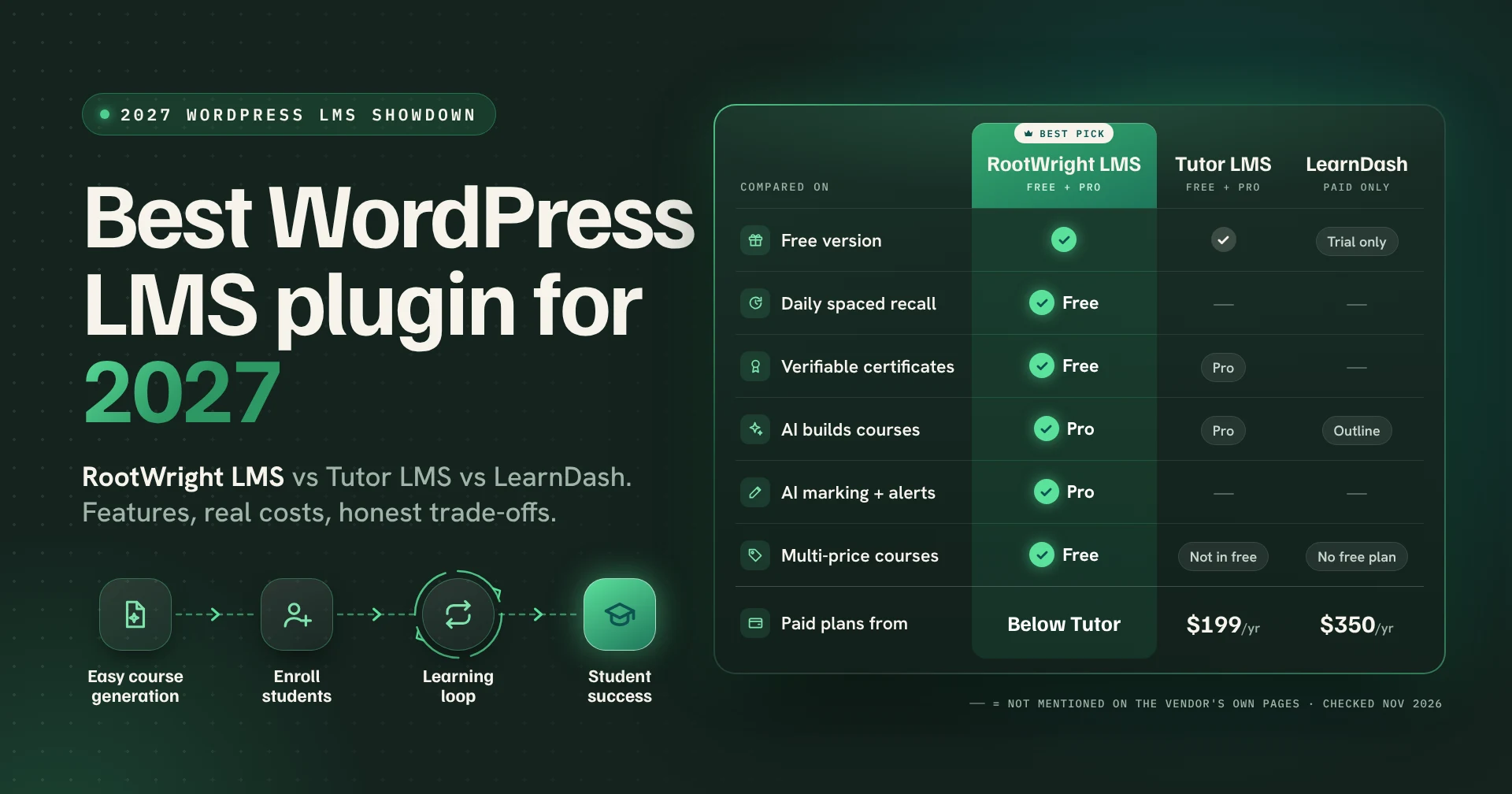
Short answer: Our pick for the best WordPress LMS plugin for 2027 is RootWright LMS. It has the standard features you’d expect from Tutor LMS or LearnDash (course builder, quizzes, assignments, certificates, payments), then does the part they skip: it helps students remember what they learned and keep growing after the course ends. The free version includes daily spaced recall (the FSRS-6 scheduler, about five minutes a day), several prices on one course and certificates anyone can verify with a QR code. Tutor LMS keeps certificate verification in Pro and doesn’t mention spaced repetition. LearnDash has no free version and starts at $350 a year. RootWright LMS Pro adds controlled AI that builds full courses, audits them, marks assignments and flags students who are falling behind, all on your own API key and budget. And RootWright LMS takes 0% of your sales.
Yes, we built it, so feel free to add a pinch of salt. We’ve shown our working below, including the places where Tutor LMS and LearnDash still beat us.
Key Points
- RootWright LMS is a WordPress LMS plugin, with a free version and a Pro version. It covers the standard features of Tutor LMS and LearnDash, and other LMS plugins and adds tools that help learners remember course material and keep improving, not just finish.
- RootWright LMS’s free version includes daily spaced recall using the FSRS-6 algorithm, several prices per course, two-way store sync with WooCommerce, Easy Digital Downloads, SureCart and FluentCart, and certificates with QR verification.
- Tutor LMS has the biggest free install base (100,000+ active installs) and its Pro starts at $199 a year for one site. Its pages don’t mention spaced repetition, and certificate verification is a Pro feature.
- LearnDash has no free version. It’s sold by Liquid Web as a bundle with Kadence, Give and The Events Calendar, from $350 a year for one site.
- RootWright LMS, like Tutor LMS, takes 0% of course revenue. RootWright LMS pricing is expected to be lower than Tutor LMS.
- RootWright LMS Pro adds exams, study plans, Open Badges 3.0, and native Stripe and PayPal checkout with sales tax and EU VA
- In the RootWright LMS private beta, a language learning centre reported after one month that 45 of its 64 students found the study plan and private recall questions very helpful, and that checkpoints and recall helped students spot their own weak areas.
- RootWright LMS Pro’s AI drafts a full course from a brief (about four to five minutes for 40 lessons at maximum effort), audits it, suggests marks and feedback on assignments, and checks every student’s progress daily. You bring your own API key from six providers, pick a model per task and set a monthly budget.
- Over three years on one site, LearnDash costs $1,050 in licence fees, Tutor LMS Pro $597, and RootWright LMS less than Tutor LMS (our calculation, current prices).
- RootWright LMS is new. Tutor LMS and LearnDash have larger communities, more third-party add-ons and, today, a few features RootWright LMS hasn’t shipped yet, such as built-in site-wide memberships.
The quick comparison: RootWright LMS vs Tutor LMS vs LearnDash
Here is a quick comparison in details for you – RootWright LMS vs. Tutor LMS vs. LearnDash
| RootWright LMS | Tutor LMS | LearnDash | |
|---|---|---|---|
| Free version | Yes | Yes | No (48-hour trial) |
| Cheapest paid plan | $149/year, 1 site | $199/year, 1 site | $350/year, 1 site (bundle) |
| Spaced repetition | Yes, free (FSRS-6) | Not mentioned | Not mentioned |
| Several prices on one course | Yes, free | Not in free | No free plugin |
| Certificate verification | Free, QR code and public page | Pro, with ID and QR | Not mentioned |
| Open Badges 3.0 | Pro | Not mentioned | Not mentioned |
| Quiz question types | 11 (6 free) | 13 | 8 |
| AI | Pro: build, audit, mark; 6 providers, your key | Pro: AI Studio, OpenAI key | AI course outline builder |
| Platform fee | 0% | 0% | Not stated |
| Built-in memberships | Not yet | Pro | Yes (MemberDash) |
| Active installs | New (beta) | 100,000+ | 100K (Liquid Web’s figure) |
“Not mentioned” means we couldn’t find it on the vendor’s own pages, not proof it’s impossible. If we’ve got something wrong, tell us and we’ll fix it.
What actually matters in a WordPress LMS in 2027
Every LMS plugin can upload a video, add a quiz and send a certificate. That part is solved. If a listicle is comparing plugins on “has quizzes: yes”, it’s comparing cars on “has wheels”.
The questions that separate the best WordPress LMS plugins now are different:
- Do students remember the material a month later? Completion rates are nice for a dashboard. Retention is what your students actually paid for.
- What will it cost over three years, not on the sale banner? First-year discounts, renewal prices and “you’ll need this add-on” all add up.
- Can you sell the way you want? One-time, subscription, payment plans and team seats, through the store you already use, without someone taking a cut.
- Does it stay fast at 10,000 students? WordPress LMS plugins that store everything in post meta tend to slow down right when the business starts working.
- Is the AI doing real work, or writing lesson titles?
We ranked RootWright LMS first because it was designed around those five questions from the start. Here’s what that looks like in practice.
1. RootWright LMS: best for courses people actually remember
RootWright LMS is a WordPress LMS plugin built by RootWright, with a free version and a Pro version. The short pitch: everything you expect from an LMS, plus the parts that make learning stick and help students grow.
Everything you’d expect from Tutor LMS or LearnDash
Switching LMS shouldn’t mean giving up the basics, so here they are. RootWright LMS has a course builder with reusable lessons, quizzes (11 question types, 6 of them free), essay and short-answer questions with manual grading, text and link assignments, certificates, drip content (Pro), course bundles, 37 editable emails, a student app, and payments through your store plugin or native Stripe and PayPal. It also connects to FluentCRM for email marketing.
That’s the table stakes. The rest of this section is about what you get on top.
Daily recall, free
Here’s an uncomfortable truth for course creators: much of what students learn on Monday has faded by Friday. The fix has been known for decades. A large 2006 meta-analysis in Psychological Bulletin, covering 839 assessments from 317 experiments, found that spacing out practice beats cramming for long-term recall (Cepeda et al., 2006).
RootWright LMS builds that into the free plugin, which makes it a WordPress LMS with spaced repetition out of the box. Each learner gets a Today screen with a short set of review questions, scheduled by FSRS-6 (the same family of algorithms flashcard fans swear by). It takes about five minutes a day. Teachers can write recall questions, and learners can add their own. Each course gets a memory-strength score from 0 to 100, so you can see whether the knowledge is sticking or quietly evaporating.
Tutor LMS and LearnDash don’t mention anything like this on their pages. Their students finish the course. Ours are meant to still know the answer in March
What happened at a language centre in our beta
A language learning centre joined the RootWright LMS private beta. After a month, we asked how it was going.
Their first observation: students could see their own weak spots. Lesson checkpoints and daily recall showed each learner what hadn’t stuck yet, before it turned into a bad exam result. That matters in language learning, where forgetting last week’s vocabulary is basically a tradition.
Then the student numbers. Of their 64 students, 45 (about 7 in 10) said the study plan and their private recall questions were very helpful. Private recall questions are the ones students write for themselves, so this is learners choosing to question themselves, which is rarer than any teacher would like. (Study plans are a Pro feature; beta testers get every Pro feature free.)
The centre also called out the explanations. Every wrong answer comes with the teacher’s explanation, so a mistake turns into a quick lesson instead of a red cross. Their overall verdict: they saw their students grow.
Course building that stays out of your way
Lessons are reusable, so the same lesson can live in three courses without copy-pasting it three times (and then fixing a typo three times). You can add checkpoints inside lessons, let learners keep private notes, and turn on pass-to-complete so a lesson only counts once the quiz is passed.
Selling: several prices, no cut, your store
A single course in RootWright LMS can have a one-time price, a subscription, a payment plan and a team price at the same time, in the free version. Tutor LMS doesn’t offer several prices per course in its free plugin, and LearnDash has no free plugin at all.
Already selling with WooCommerce, Easy Digital Downloads, SureCart or FluentCart? RootWright LMS syncs with them. Prefer to skip the cart plugin? Pro has native Stripe and PayPal checkout with subscriptions, instalments, sales tax, EU VAT and invoices. Either way, RootWright LMS takes 0% of your sales. Your payment processor will still want its slice. We can’t help with that one.
Certificates people can verify
Every RootWright LMS certificate gets a unique code, a QR code generated on your own site and a public verification page. That’s free. An employer scanning the QR code sees the real certificate, not a nicely designed PDF anyone could have made in Canva.
Pro adds Certificate Studio, conditional certificates (awarded by rules, such as “passed the final exam and finished 90% of lessons”) and Open Badges 3.0, the 1EdTech standard finalized in May 2024, so learners can share a verifiable badge on LinkedIn.
Helping students grow, not just finish
Remembering is step one. Growing is what students are really paying for, so RootWright LMS Pro gives each learner a path forward.
Study plans tell every learner what to do this week, so nobody opens the course and stares at it wondering where they left off. Mock exams are grouped by skill, which shows a student exactly which topic needs work instead of a vague “62%, try again”. Proper exams come with booking, approval, cooldowns and must-pass gates, for schools and coaching centres that run real assessments. Recall reminders arrive at times learners choose, with quiet hours, and can even come through a Telegram bot (because some students check Telegram more often than their email, and we’ve made peace with that).
Teachers get help spotting who needs a hand. With Pro’s AI, the plugin checks every student’s progress daily and flags who is falling behind (more on that below).
The growth doesn’t stop at the course either. Open Badges 3.0 lets learners put a verifiable badge on LinkedIn, which is a lot more useful in a job interview than “I promise I finished it”.
AI integration: controlled AI that does real work (Pro)
Plenty of WordPress LMS plugins have added an AI button that writes lesson titles. RootWright LMS Pro uses AI across the whole job of teaching: building the course, checking it, marking work and keeping students on track. And you stay in control of which AI runs, what it costs and what it’s allowed to touch.
Building courses
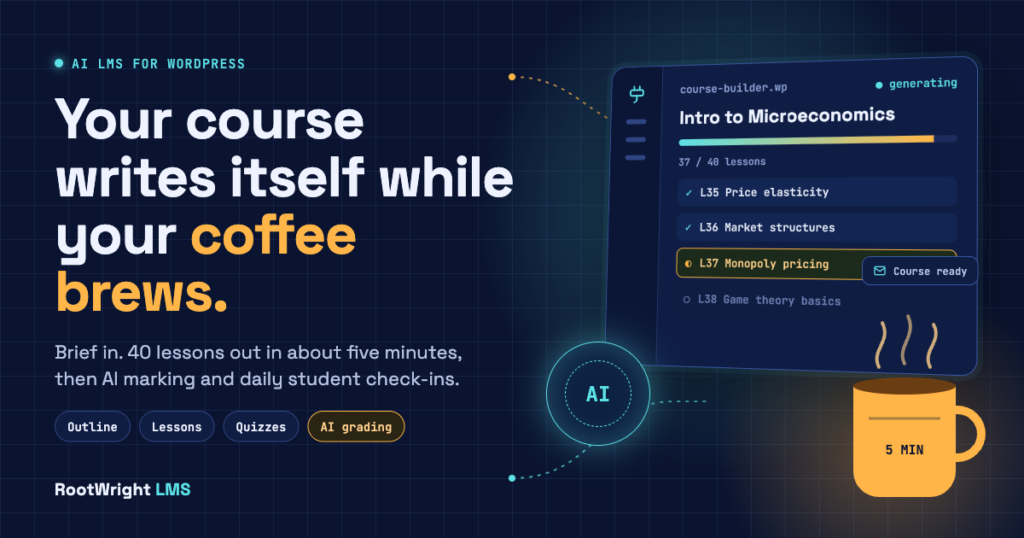
Write a brief, review the outline, click Generate. RootWright LMS drafts the full course with lessons, quizzes and a cover image. A 40-lesson course at maximum effort takes about four to five minutes, and it runs in the background, so you can close the tab and get an email (plus a WordPress admin notice) when it’s ready. If your brief doesn’t fit (say, intermediate economics in 12 lessons), the AI suggests a more realistic lesson count, and you decide whether to take it. Guided mode keeps you involved at each step; agent mode lets the AI drive more of it.
Writing in your style
Reusable skills, like the skills used by AI agents, teach the AI your house style, exam board rules or lesson structure once. Every course after that sounds like your school, not like a chatbot.
Checking and improving
An AI course audit points out gaps and thin lessons. A chat mode lets you ask “Is lesson 6 too hard for beginners?” and get an answer about your actual course.
Marking and monitoring
The AI reads assignments, writes feedback and suggests a mark. The teacher reviews it, adjusts it or accepts it, and anything the AI isn’t confident about waits for a human. Every day it also checks how each student is doing and tells teachers who is slipping, with optional nudge emails.
Learning with AI
Teachers can have the AI write questions after each lesson and require a mastery score, set by the admin, before the lesson counts as complete. Admins, teachers and students can also connect their own AI (Claude, ChatGPT or Codex) through the built-in MCP server, with permissions limited to their role.
Staying in charge of cost
Bring your own API key from Anthropic, OpenAI, Gemini, DeepSeek, Z.ai or WordPress’s own AI. Pick a different model for each task (a top model for lessons, a cheaper one for quiz drafts), set a monthly budget, and see token usage, cached tokens included. No surprise bills.
For comparison, Tutor LMS’s AI Studio needs an OpenAI key and LearnDash’s AI builds a course outline. We wrote a full breakdown, with a side-by-side table of every WordPress LMS’s AI, in our guide to the AI LMS for WordPress.
Built to stay fast
RootWright LMS stores its data in its own database tables rather than piling everything into WordPress post meta. Lesson loads and access checks go through a fast lane that answers before the rest of WordPress finishes loading, and there’s a persistent cache that works without Redis. In our own testing, a lesson opened in under 500ms on basic hosting with more than 80,000 enrolled students.
We ran the test on a Flashcloud server with 4 CPU cores and 4 GB of RAM, and got the same result on a Hostinger plan with 2 CPU cores and 4 GB of RAM.
What to know before you pick RootWright LMS
We’d rather you choose us knowing the trade-offs than switch back in six months.
- It’s new. RootWright LMS is in beta. Tutor LMS has 100,000+ active installs; we have a beta group. Fewer YouTube tutorials, fewer Stack Overflow answers. We’ll answer your email, though.
- No built-in site-wide membership yet. If you sell “all access” memberships, we can connect your existing membership plugin, and a dedicated membership plugin is in internal testing.
- Page builder support is coming. Elementor and Divi 5 support is planned for version 1.0.1. If your whole site lives in Elementor today, MasterStudy has more widgets right now.
- Fewer quiz types. Tutor LMS lists 13 question types; RootWright LMS has 11.
Best for: course creators, coaches, coaching centres, schools and training teams who measure success by what learners can do afterwards, and anyone tired of paying a premium for features that should be in the box.
2. Tutor LMS: only a bigger community or something else
Tutor LMS is the most installed free LMS on WordPress.org, with more than 100,000 active installs and a 4.4-star rating from 591 reviews (WordPress.org). The free core is generous, the course builder is friendly, and there’s a tutorial for almost anything you want to do.
Pro costs $199 a year for one site, $399 for up to 10 sites and $799 for unlimited, or $499 to $1,999 for a lifetime licence (Tutor LMS pricing). Every paid plan includes AI Studio, which needs your own OpenAI API key. Tutor doesn’t take a cut of your sales, and it has a free tool to migrate from LearnDash, LearnPress and LifterLMS.
Where it falls short for us and why some people look for a Tutor LMS alternative: no spaced repetition on its pages, several prices per course aren’t in the free plugin, and certificate verification is a Pro feature. Recent WordPress.org reviews also report problems with PayPal webhooks and quiz grading, so test your payment flow before launch.
Choose Tutor LMS if you want the safest, most-documented free option and don’t need retention tools.
RootWright LMS vs Tutor LMS in one line: Tutor LMS has the bigger community today; RootWright LMS gives you more in the free version (recall, multi-pricing, verifiable certificates) and will cost less in Pro.
3. LearnDash: best for established programs that want the whole bundle
LearnDash has been around the longest and it shows, in the good way. It’s mature, widely supported and has the deepest add-on ecosystem of any WordPress LMS.
It’s now sold by Liquid Web, and every plan is a bundle of LearnDash, Kadence, Give and The Events Calendar: $350 a year for one site, $599 for 10, up to $999 for 100 (Liquid Web). There’s no free version, only a 48-hour trial. You get 8 quiz question types, an AI course outline builder, memberships through MemberDash (now built into LearnDash), group seat sales and front-end course creation for instructors.
The catch and the main reason people go looking for a LearnDash alternative: if you don’t need a donations plugin, an events calendar and a theme, you’re paying for them anyway. It’s like ordering a coffee and being handed a muffin, a newspaper and an invoice for all three. LearnDash’s pages also don’t mention spaced repetition or certificate verification.
Choose LearnDash if you’ll use the whole bundle, sell group seats to companies at scale, or depend on a specific LearnDash add-on.
RootWright LMS vs LearnDash in one line: LearnDash wins on ecosystem and built-in memberships; RootWright LMS wins on price, a real free version, learning retention and certificate verification.
Tutor LMS vs LearnDash, if those are your two finalists
Plenty of readers arrive here choosing between Tutor LMS vs LearnDash. On the numbers above, Tutor LMS costs less over three years ($597 vs $1,050 for one site), has a free core and a larger free community. LearnDash includes memberships and the Kadence, Give and Events Calendar bundle, and it has the longer list of third-party add-ons. If you don’t need the bundle, Tutor LMS is the cheaper of the two.
How much each one really costs over three years
Sale banners are designed to be looked at for exactly one year. Here’s the licence cost over three, at today’s prices.
| Plan | Year 1 | Over 3 years |
|---|---|---|
| LearnDash, 1 site | $350 | $1,050 |
| Tutor LMS Pro, 1 site (annual) | $199 | $597 |
| Tutor LMS Pro, 1 site (lifetime) | $499 | $499 |
| RootWright LMS Pro, 1 site (annual) | $149 | $447 |
| RootWright LMS Pro 1 site (lifetime) | $449 | $449 |
| LearnDash, 10 sites | $599 | $1,797 |
| Tutor LMS Pro, 10 sites (annual) | $399 | $1,197 |
| RootWright LMS, 10 sites | $349 | $1047 |
Our calculation from each vendor’s published prices on November 7, 2026, assuming no price changes or renewal discounts. Licence fees only: payment processor fees, hosting and AI provider costs are extra for all three.
The free versions matter here too. If you’re after the best free WordPress LMS plugin for a paid school, this is where it pays off. With RootWright LMS free plus the free WooCommerce or Easy Digital Downloads, you can run a complete paid school for $0 in licence fees (renewals are manual in the free setup). With LearnDash, that number is $350 before your first student signs up.
The other WordPress LMS plugins, briefly
These are all reasonable choices for specific situations. Prices were checked on October 30, 2026.
- MasterStudy LMS: best if your site is built in Elementor. Paid plans start at $149 a year for one site and add AI Lab, SCORM import and 50+ Elementor widgets.
- LifterLMS: best for membership-style sites. The Earth Bundle is $199 for the first year and $398 after; essay grading and assignments need the Infinity Bundle ($1,598 a year at full price).
- LearnPress: best if you only need a few add-ons. The core is free with 70,000+ installs; add-ons are sold one by one or in a $299 Pro Bundle.
- Masteriyo: the cheapest way to try AI course creation, because it works in the free plugin with your own OpenAI key. Paid plans start at $99 for the first year ($199 at renewal).
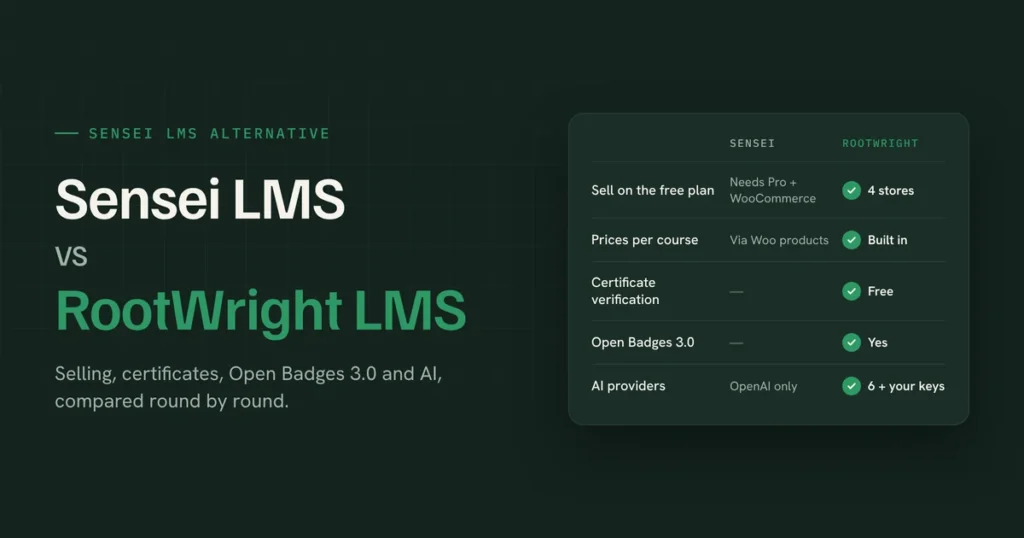
- Sensei LMS: simple courses in the block editor; you’ll need Sensei Pro at $179 a year to sell. See our Sensei LMS alternative comparison.
How to choose in two minutes
Pick RootWright LMS if students need to remember what they learn and keep improving (exam prep, certifications, languages, professional training), you want AI that builds, marks and monitors under your own budget, you want several prices per course or verifiable certificates without paying for Pro, or you’d rather not pay LearnDash prices.
Pick Tutor LMS if you want the largest free community and plenty of third-party tutorials, and retention isn’t a priority.
Pick LearnDash if you’ll use the full Liquid Web bundle, need built-in memberships today, or rely on a LearnDash-only add-on.
Still unsure? Install RootWright LMS free next to your current setup on a staging site and run one real course through it. Two hours of testing beats twenty comparison articles, including this one.
FAQ
What is the best WordPress LMS plugin in 2027?
RootWright LMS is the best WordPress LMS plugin for 2027 for course creators who want students to remember what they learn. It includes daily spaced recall, several prices per course and verifiable certificates in its free version, and takes 0% of sales. Tutor LMS is the most popular free alternative, and LearnDash is the most established paid one.
What is the best free WordPress LMS plugin?
RootWright LMS’s free version includes spaced recall, multi-price courses, store sync and QR-verified certificates, which is more than most free LMS plugins include. Tutor LMS has the largest free install base, with 100,000+ active installs.
Does LearnDash have a free version?
No. LearnDash offers a 48-hour free trial, then plans start at $350 a year for one site, bundled with Kadence, Give and The Events Calendar.
Is Tutor LMS free?
Tutor LMS has a free core plugin on WordPress.org. Tutor LMS Pro starts at $199 a year for one site, and its AI Studio needs an OpenAI API key.
Is LearnDash worth it in 2027?
LearnDash is worth it if you’ll use the whole bundle or need its add-on ecosystem and built-in memberships. If you only need an LMS, RootWright LMS or Tutor LMS gives you more for less.
Which WordPress LMS takes no cut of my sales?
RootWright LMS and Tutor LMS both take 0% of course revenue. Payment processors such as Stripe and PayPal still charge their own fees.
Which WordPress LMS has spaced repetition?
RootWright LMS includes spaced repetition in its free version, using the FSRS-6 algorithm and a daily review screen. Tutor LMS and LearnDash don’t mention spaced repetition on their pages.
Does RootWright LMS have all the features of Tutor LMS and LearnDash?
RootWright LMS covers the standard LMS features of other LMSs: course builder, quizzes, assignments, grading, certificates, drip, bundles, enrollment, profile, emails and payments etc. On top of that, it adds spaced recall, study plans, skill-based mock exams, verifiable certificates and Open Badges 3.0. Built-in site-wide memberships and Elementor widgets aren’t available yet.
Does RootWright LMS have AI?
Yes. RootWright LMS Pro uses AI to generate full courses from a brief, audit courses, suggest marks and feedback on assignments, flag students who are falling behind and create course thumbnails. You use your own API key from providers such as Anthropic, OpenAI or Gemini, choose a model per task and set a monthly budget. See the AI LMS for WordPress guide for details.
Can I move from LearnDash or Tutor LMS to RootWright LMS?
Yes, you can easily migrate from LearnDash or Tutor LMS to RootWright LMS without loosing any data or student. Very fast and efficient.
Is RootWright LMS GDPR friendly?
Student data stays on your own WordPress site, and RootWright LMS works with WordPress’s built-in personal data export and erasure tools.
Try RootWright LMS while it’s in beta
The beta has 50 seats and is all filled up, but you can still apply. Testers get every RootWright LMS Pro feature free for the whole beta, and a founding deal after it. With some minimum conditions, we are offering our founding price (70% off) to all our beta users.
Apply for the RootWright LMS beta or see every RootWright LMS feature. Bring one real course. If it doesn’t beat what you’re using now, you’ve lost an afternoon and gained a strong opinion about LMS plugins.