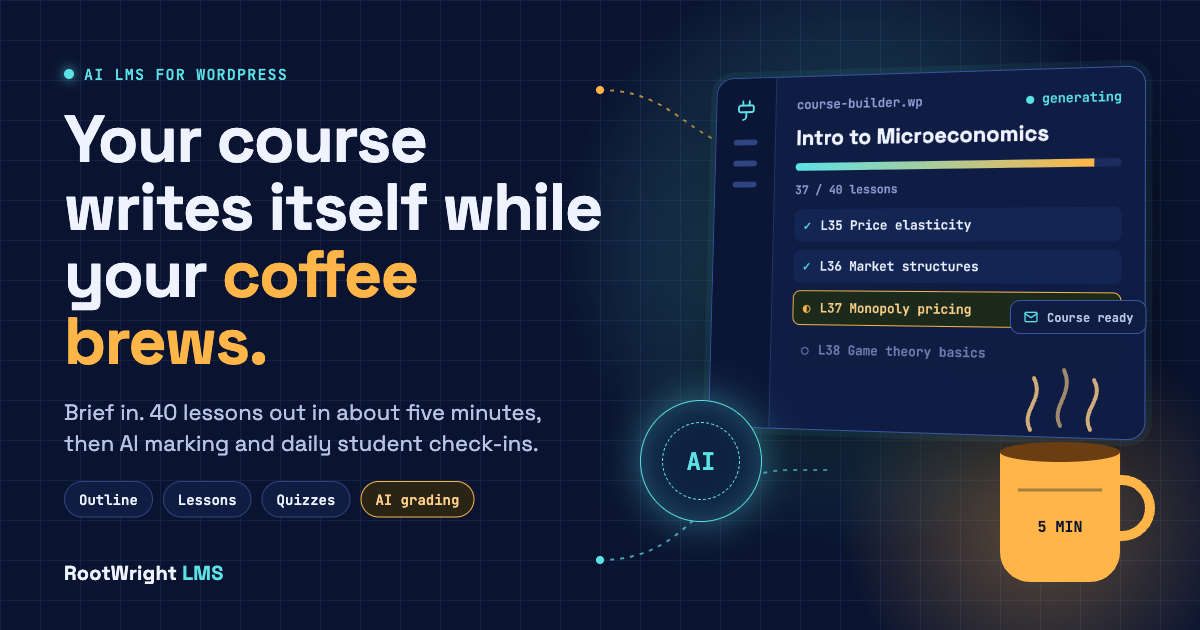
Short answer: If you want the best AI LMS for WordPress that hands you a finished course rather than a list of lesson titles, that’s what we built RootWright LMS to do. You write a brief, check the outline, press Generate and go make a coffee. A 40-lesson course at maximum effort takes about four to five minutes, and RootWright LMS emails you and sends a WordPress admin notification.
The AI doesn’t clock off once the course exists. It audits what it built, suggests marks and feedback on student work, checks every learner’s progress daily, and runs on your own API key under a monthly budget you set. Below is how each part works, followed by a side-by-side look at the AI in Tutor LMS, LearnDash, MasterStudy, Masteriyo and Sensei.
Key Points
- RootWright LMS is a WordPress LMS plugin that uses AI to turn a short brief into a full draft course: outline, lessons, quizzes and a cover image.
- RootWright LMS generates a 40-lesson course at maximum effort in about four to five minutes, writing three lessons at once.
- Course generation runs in the background, so you can leave the page. RootWright LMS sends an email and a WordPress admin notification when the course is ready.
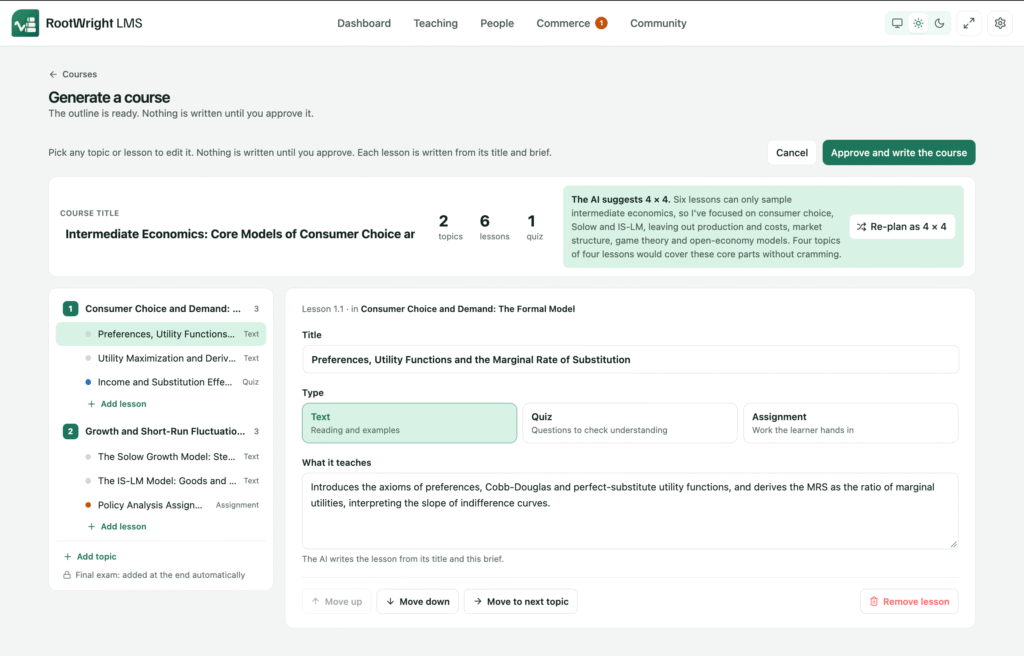
- Before anything is written, you review the outline. If the brief doesn’t fit, such as an intermediate economics course in only 12 lessons, the AI suggests a better lesson count, and you choose.
- Reusable skills make RootWright LMS write every course in your house style, the same way skills guide AI agents.
- After the build, RootWright LMS audits the course for gaps, suggests marks and written feedback on assignments, and checks every student’s progress daily to flag who is falling behind.
- You bring your own API key from providers including Anthropic, OpenAI, Gemini and DeepSeek, choose a different model for each task, set a monthly AI budget and see token usage, including cached tokens. Also, if you use WordPress AI, then you can use that with RootWright LMS, so there’s no need to put your key inside RootWright LMS.
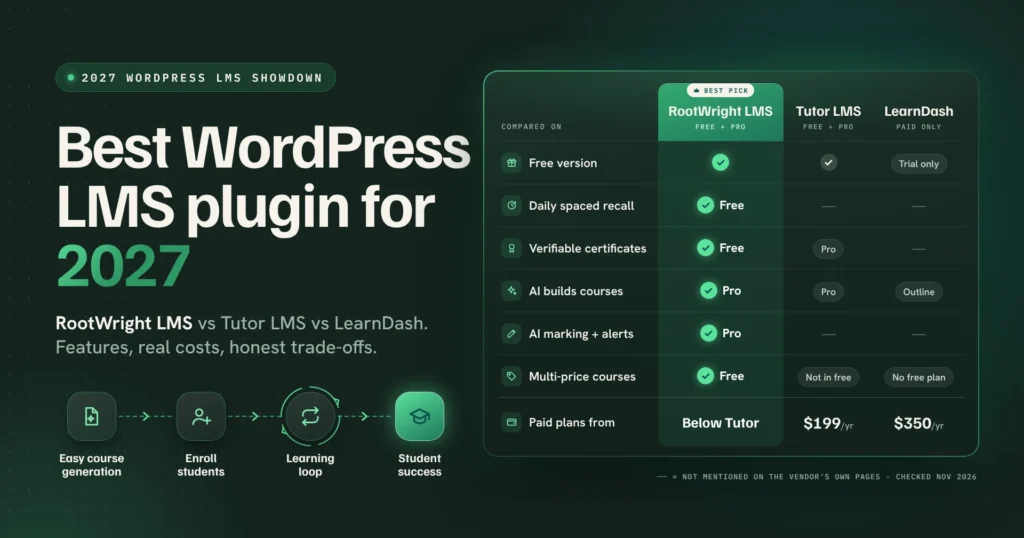
- On the AI pages of Tutor LMS, LearnDash, MasterStudy, Masteriyo and Sensei LMS, none mention AI grading, daily at-risk alerts or an AI budget inside the plugin (checked November 2026).
Where AI in most WordPress LMS plugins stops
Most WordPress LMS plugins added AI the same way, a button in the course builder that sends a prompt to OpenAI and pours the answer into your outline. It saves some typing. But it rarely saves your afternoon.
Look at the vendors’ own docs, and the limits show up fast. Sensei’s AI writes lesson titles, and regenerating removes the lessons you already have. MasterStudy asks you to keep the tab open during generation, and if you close it before saving, the course is lost, not even kept as a draft. TTutor LMS, LearnDash, Masteriyo and Sensei all run their AI on OpenAI only. And none of the pages we read from these vendors mentions AI grading, spotting students who are falling behind, or a spending cap inside the plugin.
That’s the part we cared about most. Writing a course is maybe a third of the job. Checking it, teaching with it, marking work and keeping students moving is the rest, and an AI LMS should help with all of it.
How the AI course generator works: from brief to finished course
Guided mode and agent mode
RootWright LMS gives you two ways to build with AI.
Guided mode keeps you in the loop at each step: brief, outline, generation. Agent mode hands more of the driving to the AI. In Guided Mode, RootWright drafts the outline, you review and approve it, and then a fixed pipeline writes every lesson, several at a time. It’s the fastest and cheapest way to get a draft, and it suits most course creators who have a clear brief and want a predictable yet efficient result. In Agent Mode, the AI builds the course step by step, just like a person would. It creates the course, writes the lessons, fills in the course details, then checks its own work and fixes what’s missing, and it can pull in your saved writing guides when they seem fit. It’s a bit slower and usually costs more obviously, so pick it when you want the AI to use its judgement and tidy up after itself, not just fill in an outline.
Example of a task that suits Agent mode in RootWright LMS: “Build a GDPR course for our support team in our house style, make sure every topic ends with a quiz, and fix any lessons that come out thin.”
You check the outline before anything gets written
Before a single lesson is drafted, RootWright LMS shows you exactly how the outline will look. You can easily rename a module, move a lesson, cut what doesn’t fit your taste. When it looks right, click Generate and enjoy a cup of coffee.
This may sound small but it’s the step that decides whether you end up editing for ten minutes or rewriting for two hours, because a bad structure produces forty well-written lessons in the wrong order.
It tells you when your plan won’t fit
Say you ask for an intermediate economics course in 12 lessons. That’s a lot of supply, demand, elasticity, market structures, macro basics and policy to squeeze into 12 lessons, and most teachers would wince at it.
The AI does the wincing for you. It checks whether the brief is realistic and suggests a lesson count that fits the level and scope. You can keep your 12 or take its suggestion. Either way, you decide with the trade-off in front of you instead of discovering it at lesson nine.
Go make a coffee: generation runs in the background
Once you click Generate, you’re free to go. Close the screen, work on something else in WordPress. Or leave WordPress entirely, maybe it’s time for a stretch.
RootWright LMS keeps building for you, three lessons at a time, and sends you an email and a notification on WordPress when your course is ready. Open it, read it through, change what you want and publish when you’re happy.
So the real workflow as simple as: write the brief, approve the outline, walk to the kitchen. By the time the kettle’s boiled and you’ve answered one text message, there’s a full draft course waiting for your review.
How fast is RootWright LMS’s AI course generator?
Fast enough that the coffee is the slow part. A 40-lesson course at the maximum effort level takes about four to five minutes. Lower effort levels finish much faster.
The speed comes from writing several lessons in parallel instead of one after another. On the features page, we describe it as “three lessons written at once and streamed live”, and you can watch them appear if you’d rather not leave.
Skills: teach the AI how you teach, just once
Your AI agents are the most attentive students in your WordPress LMS for sure! If you’ve used skills with AI agents like Claude, this will feel familiar. A skill is a reusable set of instructions: your house style, your exam board’s rules, how you structure a lesson, the reading level you write for.
In RootWright LMS, you can plug in custom skill files to guide your course builds. The AI follows your exact teaching rules, keeping every lesson across your whole site sounding consistent. It can even load secondary reference files on the fly when it needs extra background.
That’s how you cut down on generic AI output. Without a skill file, the AI falls back on the same default style as every other AI tool.
To see it in action, we ran the exact same prompt twice for a beginner microeconomics lesson on “Price elasticity of demand.”
The first run used no skill file:
Run 1: no skill file
“A bakery raises the price of a loaf from $4.00 to $4.40, an increase of 10%. Daily sales fall from 200 loaves to 190, a drop of 5%. Elasticity = 5% / 10% = 0.5. A 10% price rise caused only a 5% fall in sales. Buyers barely reacted.”
The second run used our economics-course-builder skill, which requires step by step math using the midpoint formula:
Run 2: course-builder skill
A coffee shop raises prices from $2.00 to $2.50 (+22.2%), dropping sales from 200 to 150 cups (-28.6%). Price change: (2.50 − 2.00) ÷ 2.25 = 22.2%. Quantity change: (150 − 200) ÷ 175 = −28.6%. Using the midpoint formula, elasticity is 28.6 ÷ 22.2 ≈ 1.29. Since it is greater than 1, demand is elastic. A 1% price bump cuts sales by about 1.29%. Buyers are price sensitive here, likely because another cafe is right across the street.
Same prompt, same base model. The skill forced the AI to show its work step by step, explain the logic in plain English, and automatically pulled in practice questions, a glossary, and local context without being asked.
AI course audit and a chat that knows your course
The AI course audit
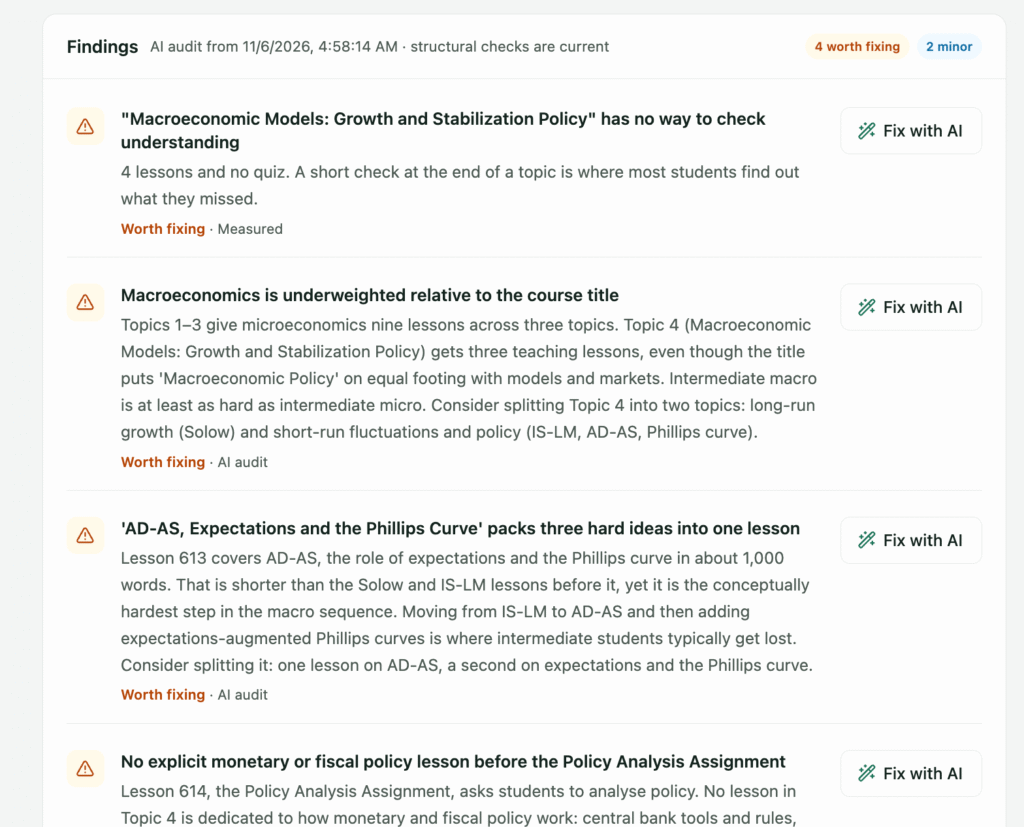
After a course is built, the AI reviews it the way a fussy colleague would. It points out gaps, thin lessons, topics that need a worked example, and places where the course could teach better. You get a list of specific fixes you can work through one by one.
Chat with AI about your course
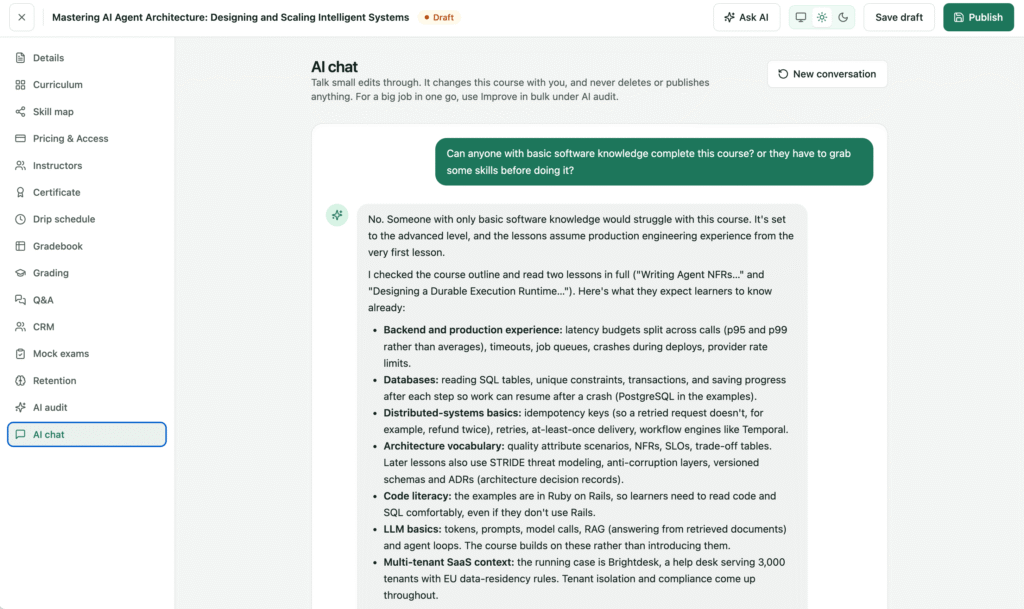
Sometimes you don’t want a report. You want to ask, “Is lesson 6 too hard for beginners?” or “What’s missing before the final quiz?”
RootWright LMS is the only AI powered LMS has a chat mode for exactly that. If you’ve used ChatGPT or Claude in a browser, it feels the same, and the conversation stays on the course you’re building.
AI grading and feedback for teachers
Marking (or grading, if you’re in the US) is where many teachers lose their evenings, so this is the feature we’d point a teacher to first.
Turn on AI marking, and when a student submits an assignment, the AI reads it, writes feedback, and suggests a mark. The teacher reads the suggestion, modifies it if needed, and grades; by default, nothing reaches the student untill they do
When there is nothing to mark, it says so. When we sent a submission containing only a file name, it suggested 0 with low confidence and explained what was missing instead of guessing.
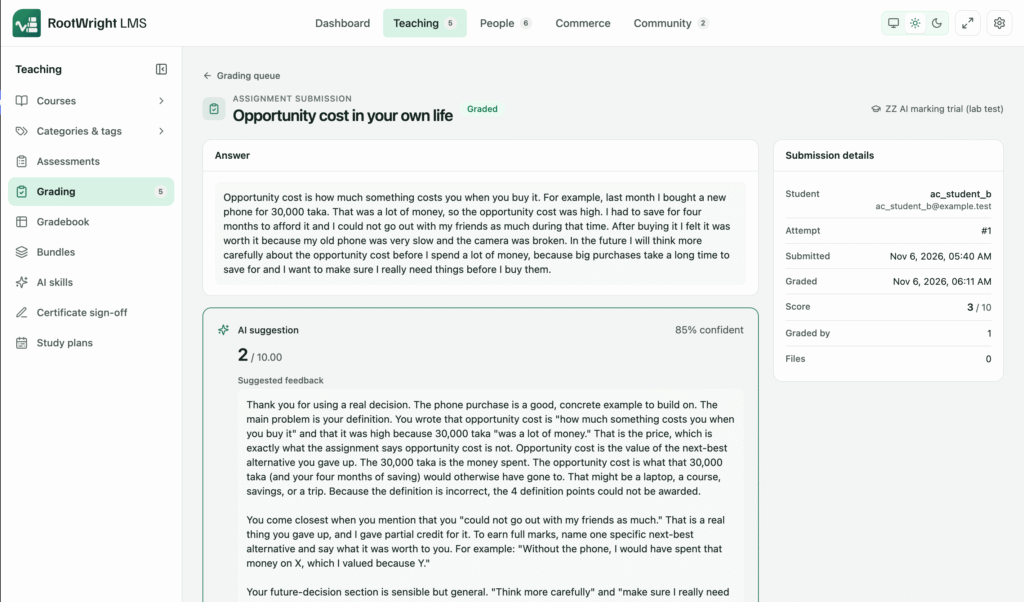
In our own trial, we wrote three answers to an economics assignment: one strong, one middling, one weak. The AI suggested 10, 2 and 1 out of 10. Our teacher kept two of those marks unchanged and raised the middling answer by one point, to 3. Three answers is a small test, but it shows how the review step works in practice.
You also decide how much trust to give it. By default, marks are suggestions. You can let confident marks publish on their own, and anything the AI is unsure about waits for a human.
A daily check on every at-risk student
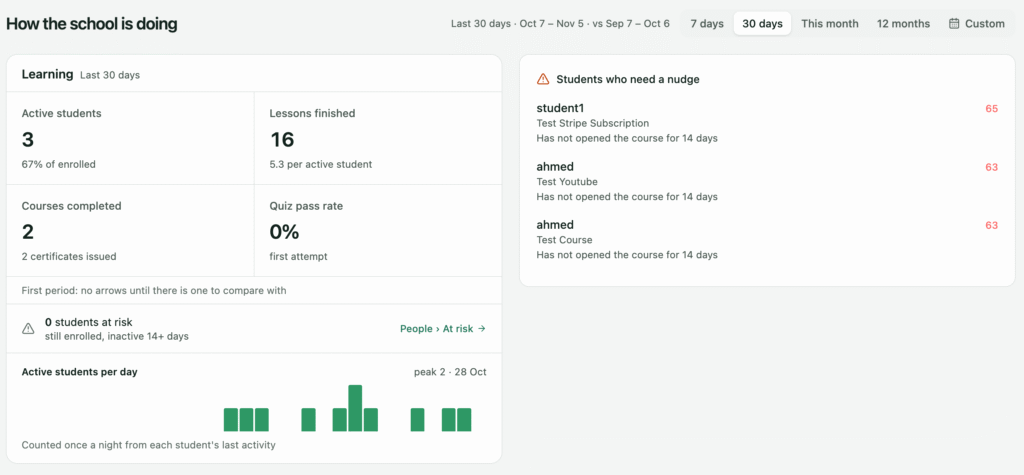
Every day, the AI looks at how each learner is doing and tells admins and teachers who is falling behind. On the dashboard, it shows up as a risk score, an admin digest and a widget, and it can send nudge emails, with an optional copy to a parent or guardian.
The point isn’t the score. It’s the phone call or message a teacher sends on Tuesday instead of finding out at the end of term. A short “Hey, noticed you’ve paused on module 3, want a hand?” often does more to keep a student going than any certificate.
AI course thumbnails
RootWright LMS can generate a course cover image with AI, so a new course doesn’t sit in your catalogue with a grey placeholder while you hunt through stock photos.
You stay in charge: keys, models and spending
This is the part we’re most opinionated about. AI in your LMS should work like any other tool your business pays for: you choose it, you see what it costs, and it can’t run up a surprise bill.
Bring your own API key (BYOK), connect your own API key from your AI provider. RootWright LMS supports six providers – Anthropic, OpenAI and OpenAI-compatible gateways, Gemini, DeepSeek, Z.ai and WordPress’s own AI client.
A different model for each job. Use one model for course generation, another for quiz questions, another for marking and grading. A top model for writing lessons and a cheaper, quicker one for quiz drafts is a perfectly sensible setup. Nothing forces you onto a single model.
Only models that still work. AI providers retire older models and eventually switch them off. RootWright LMS lists the models each provider’s API supports, so you’re not building next term’s course on a model that’s about to disappear.
A monthly budget. There’s a default monthly budget for AI course generation. Raise it, lower it, or expand it as your course library grows. When the budget is reached, generation stops instead of quietly billing on.
Token usage you can read. See how many tokens each job used, how many came from cache, and the total. Cached tokens are usually billed at a lower rate by providers, so that number is worth watching.
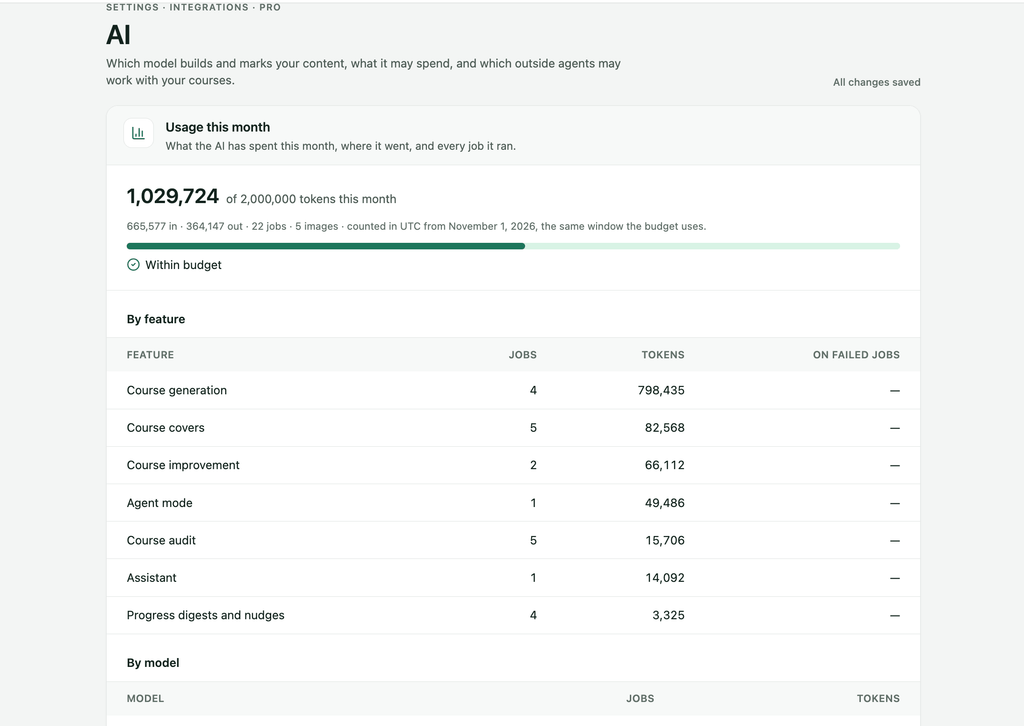
AI for students and your own AI agents
Two more things worth knowing. Teachers can have AI write questions after each lesson and require a mastery score before the lesson counts as complete, with the pass mark set by the admin. And if you already work with an AI agent, RootWright LMS has a built-in MCP server and WordPress Abilities API support, so admins and teachers can connect their own AI with permissions limited to their role. Access to student data is off by default..
How RootWright LMS’s AI compares with other WordPress LMS plugins
Here’s what each vendor’s own pages say its AI does. “Not documented” means we couldn’t find it on their pages, not proof the feature doesn’t exist.
| RootWright LMS Pro | Tutor LMS Pro (AI Studio) | MasterStudy (AI Lab, Pro Plus) | Masteriyo | LearnDash | Sensei LMS Pro | |
|---|---|---|---|---|---|---|
| What the AI builds | Full course: outline, lessons, quizzes, cover | Outline, lessons, quizzes, descriptions, feature image | Course structure, lessons, quizzes, assignments, images, FAQs | Outline, lessons, quizzes | Outline with lesson titles | Lesson titles; 3 multiple-choice questions per lesson |
| AI providers | 6, incl. Anthropic, OpenAI, Gemini, WordPress AI | OpenAI | OpenAI, Grok, Gemini, Mistral, Claude | OpenAI | OpenAI | OpenAI |
| Leave the page while it builds | Yes, with email and admin notification | Not documented | No, keep the tab open | Keep the tab open | Not documented | Not documented |
| Outline review and feasibility check | Both | Outline can be regenerated | Outline-only option | Outline-only option | Not documented | Regenerating replaces lessons |
| Reusable skills | Yes | Not documented | Not documented | Not documented | Not documented | Not documented |
| Model per task | Yes | Not documented | One text model, one image model | Not documented | Not documented | Not documented |
| Budget inside the plugin | Monthly budget, token usage | Not documented | Set in the provider’s dashboard | Not documented | Not documented | Not documented |
| AI marking with feedback | Yes | Not documented | Not documented | Not documented | Not documented | Not documented |
| Daily at-risk alerts | Yes | Not documented | Not documented | Not documented | Not documented | Not documented |
| Which plan | Pro | Pro | Pro Plus | Free add-on, all plans | Included in LearnDash core | Pro |
Sources: Tutor LMS AI Studio, MasterStudy AI Lab docs, Masteriyo AI guide, LearnDash, Sensei course outline, Sensei AI quizzes.
Fair is fair: Masteriyo gives its AI away on every plan; MasterStudy’s AI Lab also works with five text providers, LearnDash adds Virtual Instructors, an OpenAI-powered tutor for students, and Tutor’s AI Studio sits inside a plugin with a much bigger community. If all you need is a quick outline once a quarter, any of them will do. But if you want AI involved from the brief to the final grade, outline to audit course, generate image to use any popular LLM and have the full authority over spending and model selection RootWright LMS is the answer for you.
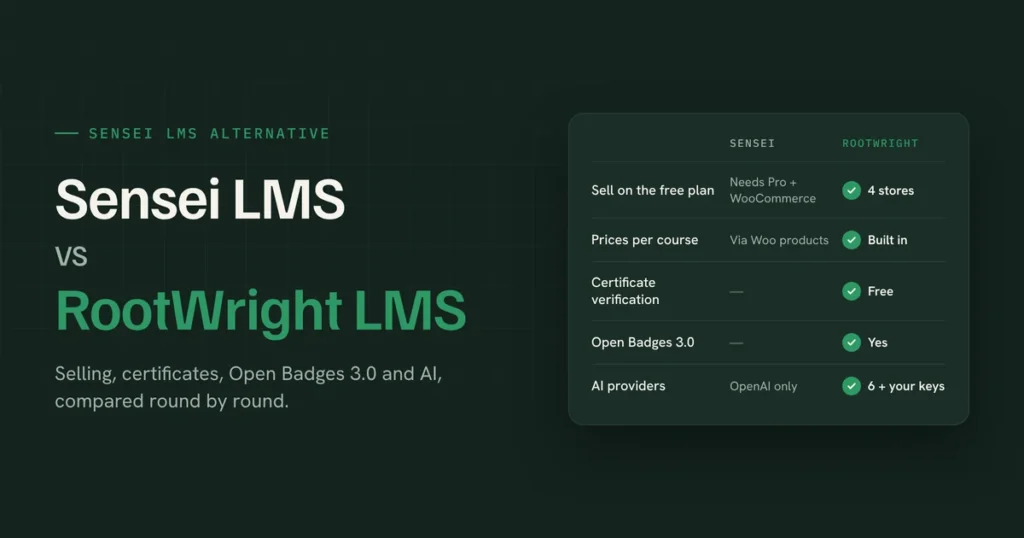
For a longer head-to-head with one of them, see our Sensei LMS alternative comparison.
Who RootWright LMS’s AI is for, and who it isn’t
It’s a good fit if you build courses often, teach cohorts where marking piles up, or run a school or training team where losing a student quietly costs real money. It suits people who want AI to do the heavy lifting but keep the final say, best way to use AI course builder.
It’s probably more than you need if you publish one course a year and enjoy writing every word yourself. You’ll also need your own AI provider account and API key, which means a separate bill from your provider. That bill is usually small, and the budget setting keeps it predictable, but it isn’t zero. And RootWright LMS is new. The community is smaller than Tutor’s or LearnDash’s, and you’ll find fewer third-party tutorials for now.
One more honest note: AI drafts still need a human read before they go live. RootWright LMS gets you to “ready to publish” much faster. You’re still the one who presses Publish.
FAQ
What is an AI LMS?
An AI LMS is a learning management system with AI built into the work of teaching: drafting courses and quizzes, reviewing course quality, marking assignments and tracking student progress. An AI-powered LMS on WordPress runs inside your own site, so courses and student data stay on your server.
Can AI create a full course in WordPress?
Yes. RootWright LMS Pro generates a full draft course from a brief, including outline, lessons, quizzes and a cover image, and a 40-lesson course at maximum effort takes about four to five minutes. You review the outline before generation and the finished draft before publishing.
Which WordPress LMS has AI grading?
RootWright LMS Pro writes feedback and suggests a grade for assignments, and low-confidence marks wait for a teacher. We didn’t find AI grading on the AI pages of Tutor LMS, LearnDash, MasterStudy, Masteriyo or Sensei (checked November 2026). This is undoubtedly the best AI LMS out there.
Do I need my own API key?
For AI course generation in RootWright LMS, yes: you bring your own key from a supported provider such as Anthropic, OpenAI or Gemini, and you pay the provider directly. It can also use WordPress’s own AI client.
How much does it cost to generate a course with AI?
It depends on the model and the course size. In our test, we found that a course with 20 lessons, a thumbnail, and all course-related details took on average 650,000 tokens. RootWright LMS shows token usage per job and enforces a monthly budget, so you set the ceiling.
Can I use Claude or Gemini instead of ChatGPT?
Yes. RootWright LMS supports Anthropic (Claude), OpenAI, Gemini, DeepSeek, Z.ai, OpenAI-compatible gateways and WordPress’s AI client, and you can use a different model for course generation, quizzes and marking.
Is AI-generated course content good enough to publish?
With a solid brief, a reviewed outline and a skill that captures your teaching style, it’s close. The built-in audit flags weak spots before students see them. Plan on a read-through and a few edits, not a rewrite.
Can I use WordPress AI to generate a course?
Of course, if you have WordPress AI already connected on your site, then from RootWright LMS AI settings just pick WordPress AI as your provider.
Try it on a course you actually need
The best test is a real one. Pick the course you’ve been putting off, write a one-paragraph brief, approve the outline, and take a five-minute break. When you’re back, read what’s waiting for you.
AI in RootWright LMS is part of Pro. It’s currently in public beta, and beta testers get every Pro feature free until it ends. Join the RootWright LMS beta or browse every AI feature in Pro.