RootWright LMS is a Sensei LMS alternative: a WordPress LMS plugin built for the gaps that push people off Sensei. Unlike Sensei’s free plugin, its free version sells courses through WooCommerce, Easy Digital Downloads, SureCart or FluentCart. Anyone can verify its certificates. It also issues Open Badges 3.0 credentials, and Pro adds AI that drafts a full course.
People usually outgrow Sensei for three reasons. You can’t sell anything without paying for Sensei Pro and installing WooCommerce. Nobody outside your site can verify your certificates. And the AI tools stop at lesson titles and three quiz questions. RootWright LMS’s free version lets you set several price options per course. It gives every certificate a public verification page and gives students a daily recall routine. Open Badges 3.0 is the open standard for verifiable digital credentials, and Sensei doesn’t offer it. Pro adds native Stripe and PayPal checkout and a canvas certificate designer. It also drafts full courses with the AI provider you choose.
Sensei is still a good fit for some sites, and we’ll say which ones. Here’s the comparison, area by area, with links to Sensei’s own documentation so you can check every claim.
Key points
- RootWright LMS Free sells courses through WooCommerce, EDD, SureCart or FluentCart; Sensei needs Sensei Pro and WooCommerce.
- RootWright LMS Free issues verifiable certificates and Open Badges 3.0 credentials, which Sensei’s PDF certificates lack.
- Every RootWright LMS student gets a daily recall session scheduled with FSRS-6 spaced repetition; Sensei is mostly lesson by lesson.
- RootWright LMS Pro’s AI drafts full courses with your chosen provider; Sensei Pro’s AI writes lesson titles and quiz questions.
- For an established WooCommerce store selling courses among other products, Sensei still fits; RootWright LMS imports Sensei courses.
Sensei LMS vs RootWright LMS at a glance
| Sensei LMS | RootWright LMS | |
|---|---|---|
| Made by | Automattic | RootWright LMS team |
| Free version | Unlimited free courses, basic quizzes, Learning Mode, certificate add-on | 126 free features, including selling, verification and spaced recall |
| Sell courses in the free version | No. Needs Sensei Pro and WooCommerce | Yes, through WooCommerce, EDD, SureCart or FluentCart |
| Multiple prices per course | Through several linked WooCommerce products (Pro) | Built in, free: one-time, subscription, payment plan, sale price, setup fee, access length |
| Native checkout (no store plugin) | Not offered | Pro: Stripe and PayPal |
| Certificate design | Background image plus five fixed text areas | Free: two templates. Pro: Certificate Studio canvas designer with 11 starters |
| Certificate verification | Not offered | Free: credential codes, QR codes and a public verify page |
| Open Badges 3.0 | Not mentioned anywhere in Sensei’s listings or docs | Yes, in Free with more in Pro |
| Quiz question types | Multiple choice, fill in the blank, true/false, free response, file upload and more; ordering in Pro | 6 free, 11 with Pro |
| AI | Pro: lesson-title outline, 3 AI quiz questions per lesson, Tutor AI block. OpenAI only | Pro: full course drafts, agent mode, AI marking, skill library. Six providers or your own gateway |
| Bring your own AI key | No | Yes |
| Exams, study plans, placement tests | Not offered | Pro |
| Paid entry price | Sensei Pro $179/year, one site | Announced at launch; free during the beta |
Sensei details are from senseilms.com and its documentation, checked November 1, 2026.
Building a course
Sensei builds courses inside the WordPress block editor. A course is a post, you add lessons through the course outline, and lesson content is blocks. If your team already lives in Gutenberg, that feels natural. Learning Revolution’s review points out the catch: Learning Mode works only with block-editor content. Teams that build pages in Elementor or Divi end up working in two editors.
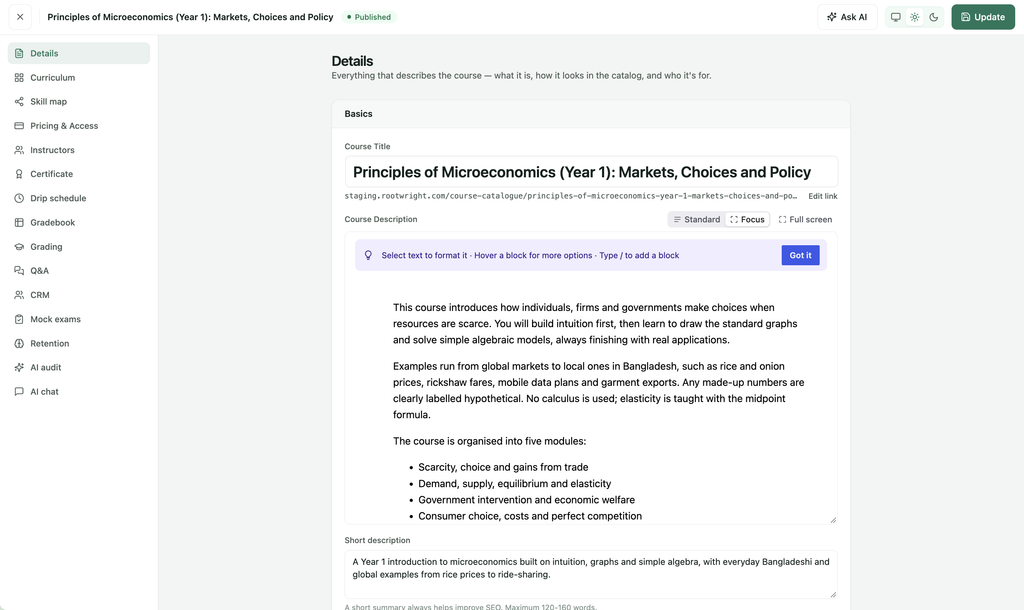
RootWright LMS gives you a full-screen course builder instead. You lay out modules and lessons in one place and pick a lesson type (text, video, quiz, Q&A or assignment). You can still write the lesson body in the block editor when you want to. A few things in the free version save real time once you have more than a couple of courses:
- A reusable lesson library, so a lesson you use in three courses is written once.
- Importing a whole module from another course, and duplicating a course.
- Scheduled course opening and a publish review workflow, so a second instructor can’t push a half-finished course live.
Pro adds multiple prerequisite courses (all-of or any-of) and drip by date, days after enrolment, sequence or prerequisite.
Theme compatibility
Both plugins say they work with any theme, and both lean on the Site Editor. The details differ.
Sensei’s distraction-free Learning Mode is built from Site Editor templates. The free plugin includes the Default template and Sensei Pro adds three more. Sensei’s own docs note that “if you are not using a block theme, only the Templates from Sensei are going to be available”. They also say the lesson’s Video Embed Code setting has no effect in Learning Mode. On a classic theme, expect to work within those limits.
RootWright LMS ships three designs (Grove, Canopy and Field Guide) that inherit your theme’s colours and fonts. It also includes Site Editor templates for block themes and a separate course page layout for classic themes. Seven blocks let you place LMS pieces anywhere a block can go. They cover course listing, single course, dashboard, sign in, profile directory, certificate and verify.
The student’s side of the course
Sensei’s student experience centres on Learning Mode. It’s a two-column layout with course navigation on the left and the lesson on the right. Quizzes come at the end of lessons. If you’ve bought Interactive Blocks or Pro, you also get Sensei’s interactive blocks (flashcards, hotspots, interactive video). It’s clean and focused, and it’s mostly a lesson-by-lesson experience.
RootWright LMS is built on the idea that finishing a lesson isn’t the same as remembering it. Every student gets a dashboard app with a Today view, a short daily session of recall questions. Questions are scheduled with FSRS-6, a modern spaced-repetition algorithm. It brings each question back just before the student is likely to forget it. Students can write their own recall questions and keep pinned private notes in the course player. They can also track streaks and see a memory strength score from 0 to 100. Instructors can drop checkpoint blocks (key concept, quick check, pre-question) into lessons. All of that is free.
Pro turns it into a study system. It adds dated study plans across courses and exams, placement tests and at-risk learner alerts. It also adds questions inside videos and confidence ratings. A Telegram bot sends recall questions with answer buttons, so students can practise without logging in.
What the free version can actually do
Sensei’s free plugin is honest about its scope. You get unlimited free courses, a certificate builder, basic quizzes, Learning Mode and theme compatibility. It’s a solid way to publish free courses. The moment you want to charge, you need Sensei Pro.
RootWright LMS’s free version lists 126 features on its features page. The ones that matter most when you compare against Sensei Free:
- Selling through four store plugins, with several price options per course (more on that below).
- Certificates with public verification.
- Spaced recall and the student Today view.
- Six quiz question types, auto and manual grading, a grading queue and text or link assignments.
- 37 email templates with a visual designer and a delivery queue that retries failed sends.
- A front-end instructor dashboard and a permission manager with 16 instructor permissions.
- Course schema (Course, Offer, AggregateRating) and an /llms.txt catalogue, so search engines and AI assistants can read your course list.
Selling courses: multiple prices without Pro
This is the biggest practical difference between the two.
With Sensei, selling requires Sensei Pro, WooCommerce and a payment gateway. Sensei’s own FAQ puts it plainly: “If you want to sell your courses, WooCommerce and Sensei Pro would be needed.” Recurring billing and memberships run through WooCommerce Subscriptions and WooCommerce Memberships, which are separate extensions. If you want two prices for one course, you create two WooCommerce products and link both to it. Visitors also need an account before they can buy.
RootWright LMS’s free version connects to WooCommerce, Easy Digital Downloads, SureCart or FluentCart, whichever you already run. Each course can carry multiple price options set right on the course:
- One-time price
- Subscription
- Payment plan (instalments)
- Sale price
- Setup fee
- Access length
Prices sync to your store, and seat limits and discounts are included. RootWright LMS takes 0% of your sales on every plan.
If you already sell through FluentCart or EDD, that’s the end of the story: you don’t need WooCommerce at all.
Native payments in Pro
Some sites don’t want a store plugin just to sell five courses. RootWright LMS Pro includes a native checkout with Stripe (one-time payments, subscriptions, refunds, cancel at period end, 3-D Secure). PayPal handles one-time payments, subscriptions and refunds, and you can add your own gateway. It also handles sales tax and EU VAT, checking EU VAT IDs against VIES and applying reverse charge. Invoices and credit notes are built in. Course bundles, single-lesson sales and recurring coupons are in Pro too.
Sensei has no native checkout. Every payment goes through WooCommerce and whichever WooCommerce gateway you install. For a shop that already runs WooCommerce, that’s a plus. For a course-only site, it’s an extra plugin stack to maintain.
Certificates: verification, Open Badges 3.0 and Certificate Studio
Certificates are where the gap is widest, and it’s the area other comparisons skip.
Sensei’s certificates come from a separate free plugin, Sensei LMS Certificates. You upload a background image and drag five fixed text areas onto it: heading, course, message, completion date and place. The result is a PDF. You get one custom font, and it replaces the font in every template. By default only the student and the admin can see a certificate. A student can make theirs public from their profile and share the link. Neither the plugin listing nor the docs mention a verification code, QR code or verification page. That means an employer who receives a Sensei certificate has no way to confirm it’s real.
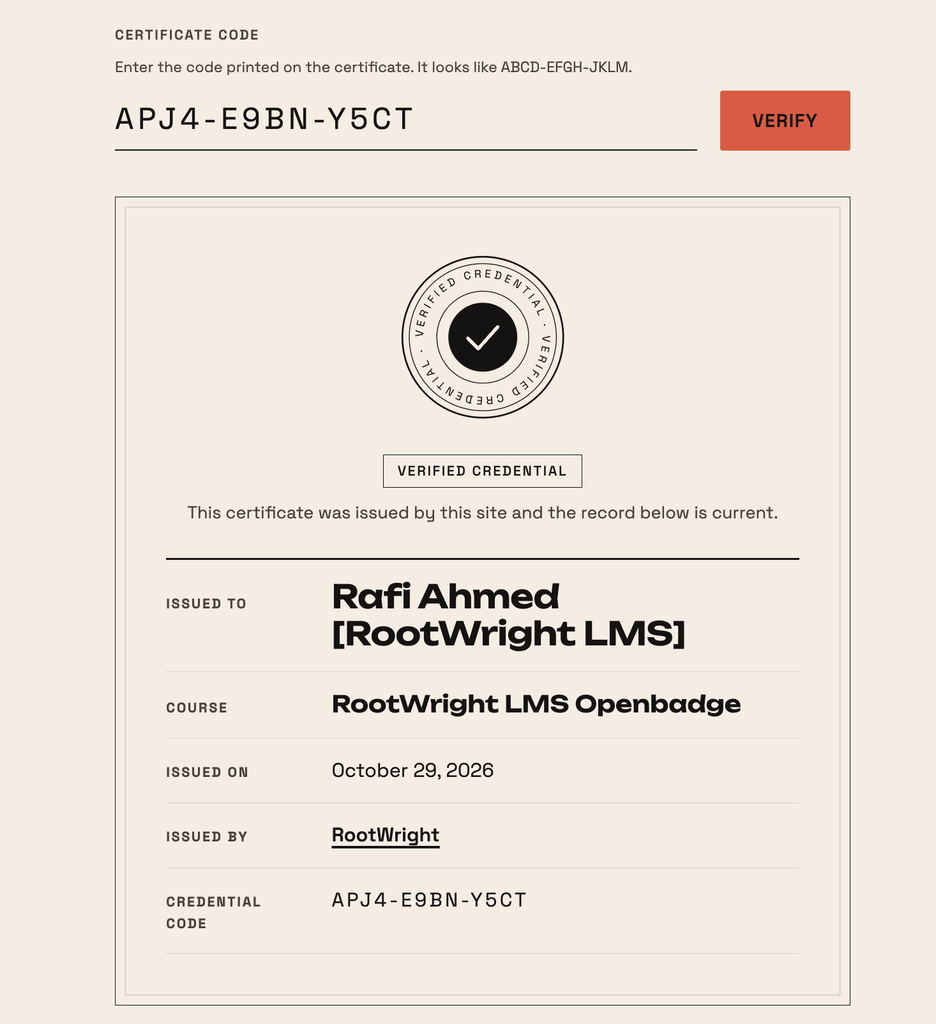
RootWright LMS includes verification in the free version. Every certificate gets a random credential code and a QR code generated on your own server. Anyone can check it on a public verification page, with no third-party calls. Two built-in templates (landscape and portrait) cover most courses, and certificates issue automatically on completion.
Pro adds Certificate Studio, a canvas designer with 11 starter designs, font choices and PDF download. It also adds award rules, re-checked nightly. A certificate can require passing a final exam or reaching a course grade. It can also require clearing certain checkpoints or keeping up recall. You can set a template per course, add signatures with a sign-off queue and print the grade on the certificate. You can also freeze versions so a design change doesn’t rewrite certificates you’ve already issued.
Open Badges 3.0
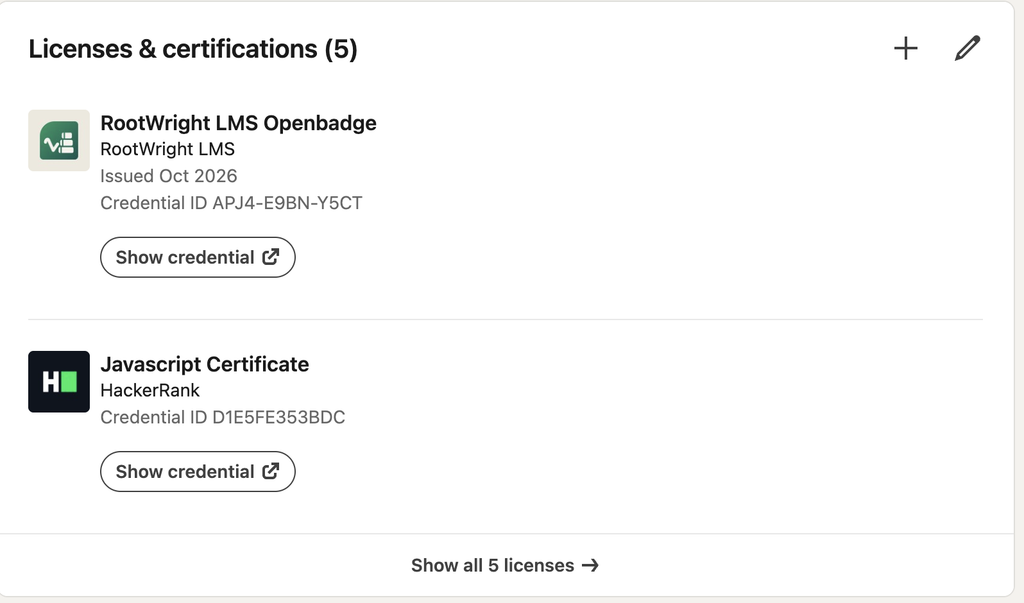
RootWright LMS is compatible with Open Badges 3.0. For schools and training providers, this may matter more than anything else on this page.
Open Badges is the open standard for digital credentials, maintained by 1EdTech. Version 3.0, publicly released in May 2024, is built on the W3C Verifiable Credentials data model. In plain terms, each badge is a tamper-evident credential that can be cryptographically verified. Learners can accept it into a digital wallet and carry it beyond your site. Compare that with a PDF. Anyone can edit a PDF, and it only proves something if the reader trusts whoever sent it.
Sensei’s plugin listing, its certificates add-on and its integrations page make no mention of Open Badges. Its certificates are PDFs.
Here is a real example from LinkedIn:
You can also verify this easily below a screenshot is added:
AI: what each plugin actually does
Sensei’s AI features are in Sensei Pro and sit on OpenAI:
- Course Outline AI writes lesson titles from a course description, skill level and audience. Running it again on an existing course “will remove the existing lessons from the course.”
- AI quiz generation writes three multiple-choice questions per lesson, “powered by OpenAI”. Sensei caps it at three because quality dropped after that in their testing. The button is disabled if the lesson already has questions.
- Tutor AI is a block where students answer a question you set and get hints from ChatGPT. It runs through Sensei’s own integration. It’s sold in Interactive Blocks ($60/year) and included in Pro. You can’t use your own key.
Those are useful helpers. They don’t write lessons.
RootWright LMS Pro’s AI works at the course level. You give it a brief and it proposes a blueprint. Once you approve the outline, it drafts the full course, three lessons at a time in parallel and streamed live. It retries any lesson that fails on its own. Partial results are kept if something stops midway. From there, agent mode (a tool-using agent limited to that course and capped) can build the course. You can also chat with a Course Assistant, run an AI course audit and rewrite sections with “Improve with AI”. It also generates wordless 16:9 course covers and drafts emails. AI marking grades assignments and waits for a human when it isn’t sure.
How long a full course takes
RootWright LMS lets you set a thinking level for course generation. Here’s how long a full course draft took at each level:
| Effort level | Time to a full draft course |
|---|---|
| Low | 1 min 40 s |
| Medium | 2 min 38 s |
| High | 3 min 48 s |
| Max | 5 min 43 s |
We ran the test on a Flashcloud server with 4 CPU cores & 4 GB RAM machine. The same result came on Hostinger with a 2 CPU cores & 4 GB RAM machine.
Low is fine for a first draft you plan to rewrite. Higher levels spend more time reasoning and suit courses where accuracy matters, like compliance or exam prep. There’s no fair Sensei number to put next to these, because Sensei’s outline tool only writes lesson titles.
Your models, your rules
This is the part we’d point to if AI matters to you. RootWright LMS doesn’t lock you into one provider:
- Bring your own key for Anthropic, OpenAI (and any OpenAI-compatible gateway), Gemini, DeepSeek or Z.ai, or use WordPress’s own AI Client with no key in the plugin at all.
- Choose the model and settings that fit the job. For example, you can choose Claude Fable 5 for course building, but it’s expensive, so save enough money 🙂 Opus 5.5 for grading and other tasks.
- AI skills: a library of reusable instructions in SKILL.md format, with versions and sharing. Write your house style or your exam board’s rules once, and every generated lesson follows them.
- Cost controls: monthly token budgets, concurrency caps, thinking levels, prompt caching and a usage page. A busy month won’t surprise you.
- MCP server: a built-in server with 16 tools lets agents like Claude Desktop work with your LMS. Access uses scoped per-user tokens. Student data is off by default.
Pro features Sensei doesn’t offer
Beyond payments, certificates and AI, RootWright LMS Pro covers ground Sensei doesn’t:
- Exams as a lesson type, with booked windows, approval, cooldowns, must-pass gates and mock exams drawn per learner.
- Assignments with file uploads, due dates, late penalties, multiple attempts and return for revision. Includes a teacher gradebook with CSV export.
- Video hosting through Bunny Stream or Cloudflare Stream, with resume, a watched threshold and a viewer watermark. Sensei’s FAQ says “Sensei is not a video host” and points you to VideoPress.
- Live lessons with Zoom and Google Meet built into lessons.
- FluentCRM with 12 LMS events, and teaching teams with co-instructors and assistants.
When Sensei LMS is still the better choice
We’d rather you pick the right tool than switch for the wrong reasons. Stay with Sensei if:
- You run an established WooCommerce store and courses are one product among many. Sensei was originally a Woo plugin and fits that setup well.
- Your content leans on Sensei’s interactive blocks (interactive video, flashcards, image hotspots). They’re good, and they work in other plugins too.
- You need guest access for free lead-generation courses, or Sensei’s groups and cohorts.
- You want a plugin from Automattic with years of history behind it. RootWright LMS is new and in beta, and a younger plugin means a smaller community and fewer third-party tutorials.
Pick RootWright LMS if you need to sell courses without WooCommerce, verify certificates or issue Open Badges 3.0 credentials. It’s also the stronger fit for exams, study plans or using AI on your own terms.
How to migrate from Sensei LMS to RootWright LMS
RootWright LMS stores courses and lessons as WordPress posts and keeps enrolments and progress in dedicated tables. Your content stays in WordPress. It also has an importer from Sensei to RootWright LMS, so it’s just a click away to migrate.
FAQ
Can I use Sensei LMS without WooCommerce?
Yes, for free courses. To sell, Sensei’s own FAQ says you need WooCommerce and Sensei Pro. RootWright LMS can sell from its free version through WooCommerce, EDD, SureCart or FluentCart, and Pro sells without any store plugin through Stripe and PayPal.
Is Sensei LMS free?
The core plugin is free and lets you publish unlimited free courses. Selling, advanced quizzes, groups and AI features need Sensei Pro at $179 a year for one site.
Does Sensei LMS have AI features?
Yes, in Sensei Pro: an outline generator that writes lesson titles, AI quiz generation (three multiple-choice questions per lesson) and the Tutor AI block. They run on OpenAI and you can’t bring your own key.
Can Sensei LMS certificates be verified?
Not according to Sensei’s documentation. Certificates are PDFs visible to the student and admin, and students can make them public through their profile. RootWright LMS’s free version adds credential codes, QR codes and a public verification page.
Does Sensei LMS support Open Badges?
Sensei’s plugin listing, certificates add-on and integrations page don’t mention Open Badges, and its certificates are PDFs. RootWright LMS is compatible with Open Badges 3.0, the 1EdTech standard built on W3C Verifiable Credentials.
What does RootWright LMS cost?
Pricing is announced at launch. During the private beta, testers get every Pro feature free and 70% off any plan when the beta ends, locked in while they renew. RootWright LMS takes 0% of your course sales on every plan.
Try RootWright LMS before you move a single course
The fastest way to see whether RootWright LMS fits is to build one real course in it. Round 1 of the private beta has 50 seats and closes November 10, 2026. Beta testers get every Pro feature free for the whole beta. If you’d rather look first, the full feature list shows exactly what’s free and what’s Pro.